How To Withdraw Funds From Your DOPAY Wallets

Learn how to withdraw funds from your DOPAY e-wallet or crypto wallet to your personal or another user’s bank account or to another user’s e-wallet and crypto wallet.  

With DOPAY, you can withdraw or send funds from your DOPAY wallets in a few simple steps. Depending on your needs, you may send funds to a bank account, transfer crypto to another user’s DOPAY crypto wallet, or send funds to another user’s DOPAY e-wallet. 

When Should You Use the DOPAY Withdrawal Feature? 

You may use the withdrawal feature when you want to: 

  • Transfer your DOPAY e-wallet funds to your personal bank account  
  • Send funds to another person’s bank account  
  • Move crypto from your DOPAY wallet to another DOPAY user’s crypto wallet  
  • Send money to another DOPAY user’s e-wallet  
  • Manage your funds conveniently from one wallet  

DOPAY helps make fund transfers easier by giving you different withdrawal options in one app. 

How To Withdraw Funds From Your DOPAY Wallet 

Follow these steps to withdraw funds from your DOPAY wallet. 

Step 1: Open the DOPAY App 

Log in to your DOPAY account using the mobile app. Make sure your account details are correct and your wallet has enough available balance for the transaction. 

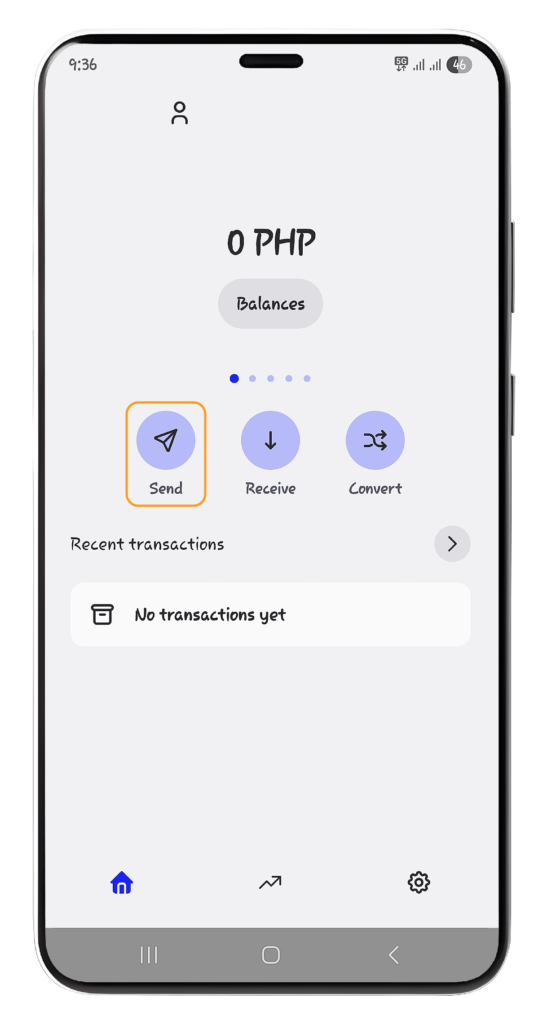
Step 2: Select “Send” 

From your DOPAY wallet screen, tap “Send.” This will show the available transfer or withdrawal options. 
Step 3: Choose Your Preferred Withdrawal Option 

You can choose the option that matches how you want to send or withdraw your funds. 

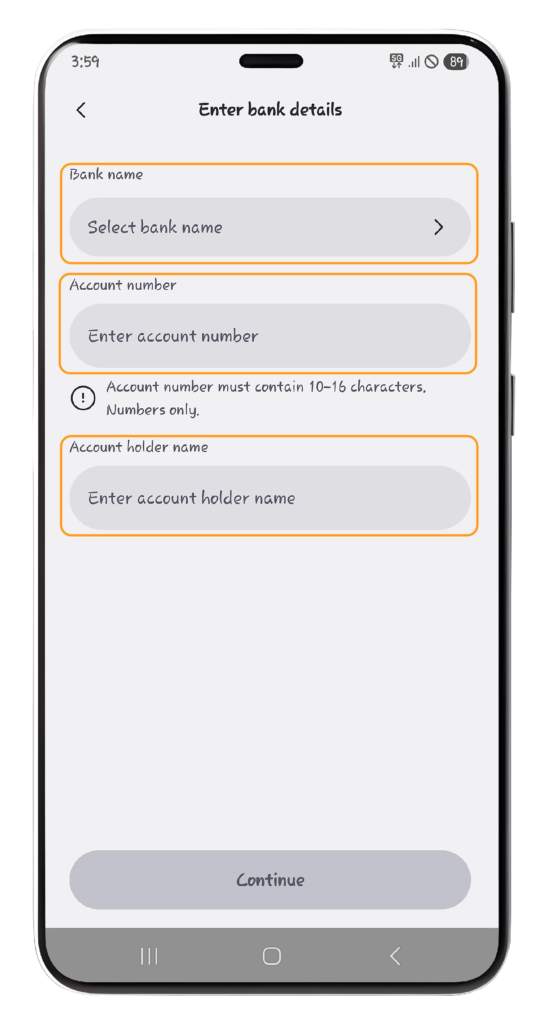
Option 1: Send to Bank Account 

Choose “Send to bank account” if you want to withdraw your funds to a bank account.  
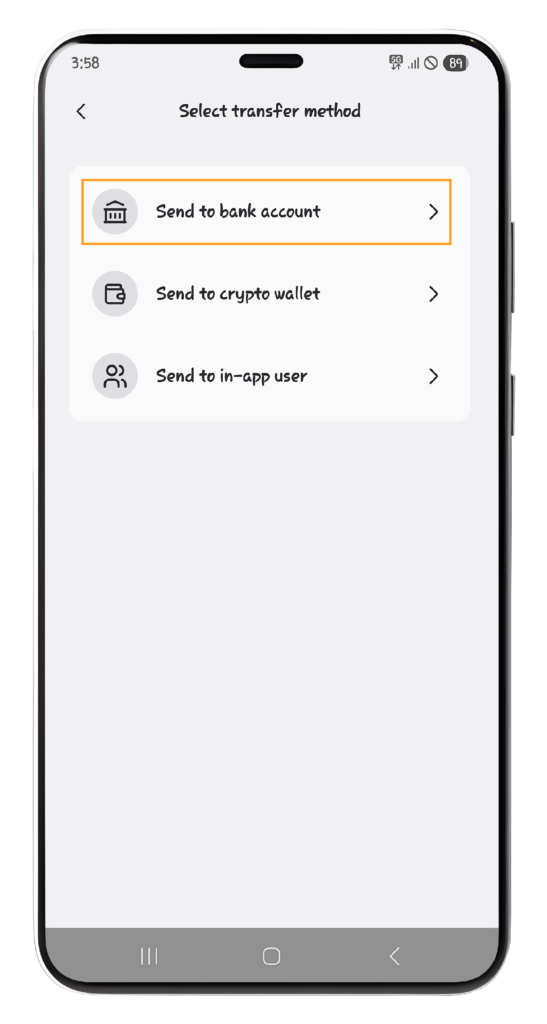
You will need to enter the following details: 

  • Bank Name  
  • Account Number  
  • Account Holder Name  
  • Amount to withdraw 

Then, enter the “Amount” you wish to withdraw. 
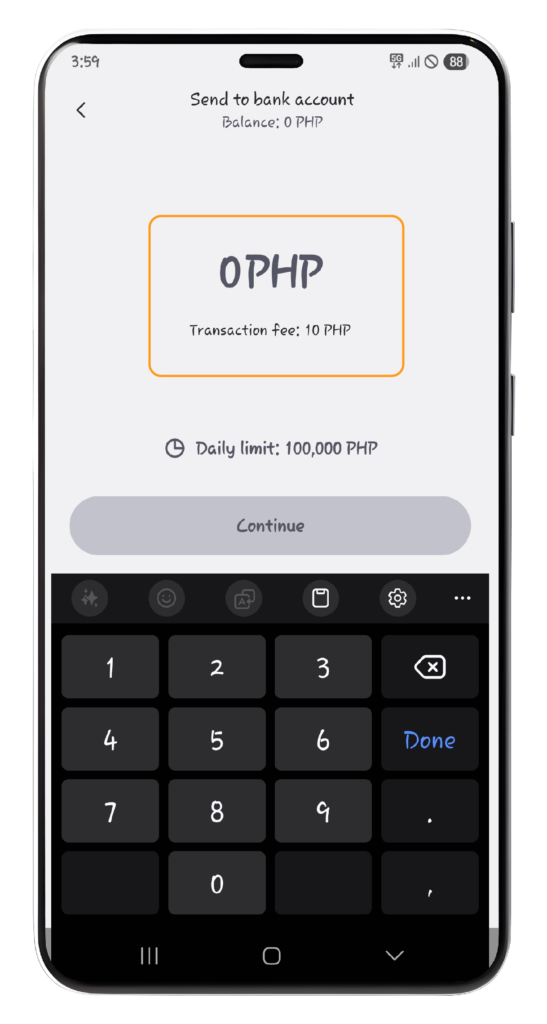
Before confirming, carefully review the bank details. Incorrect account information may cause delays or failed transactions. 

Example Use Case 

Use this option when you want to transfer your DOPAY wallet balance to your savings account, payroll account, or another supported bank account. 

Benefit 

This is useful when you want to access your funds through your bank, withdraw cash through an ATM, or keep money in your regular bank account. 

Option 2: Send to Crypto Wallet 

Choose “Send to crypto wallet” if you want to transfer supported cryptocurrency from your DOPAY wallet to an external crypto wallet. 
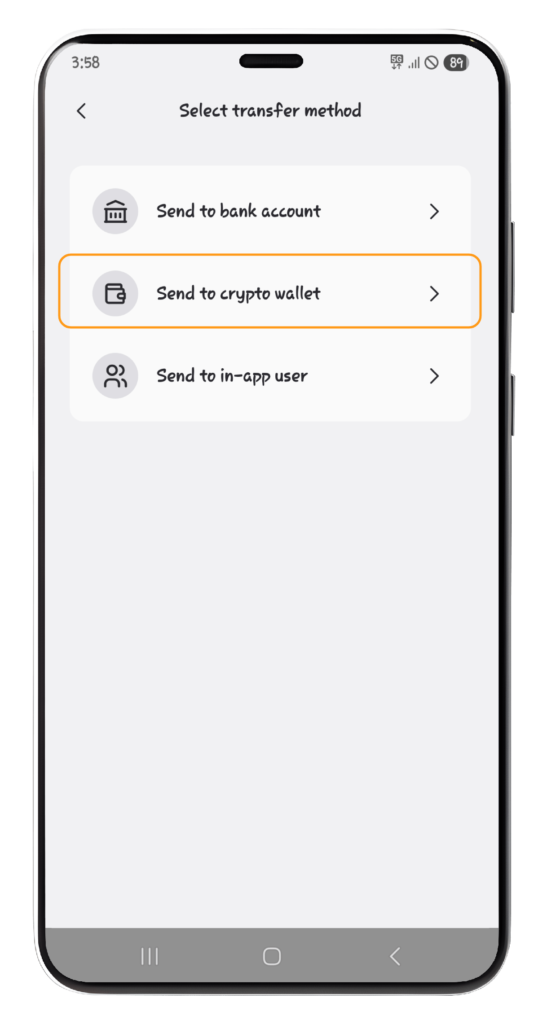
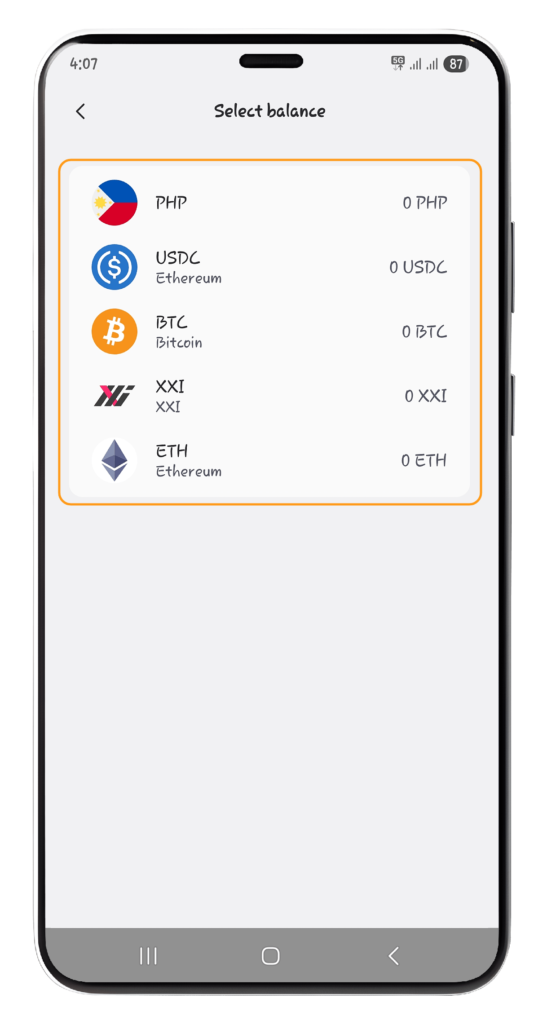
Then, Choose your preferred “Token.” 
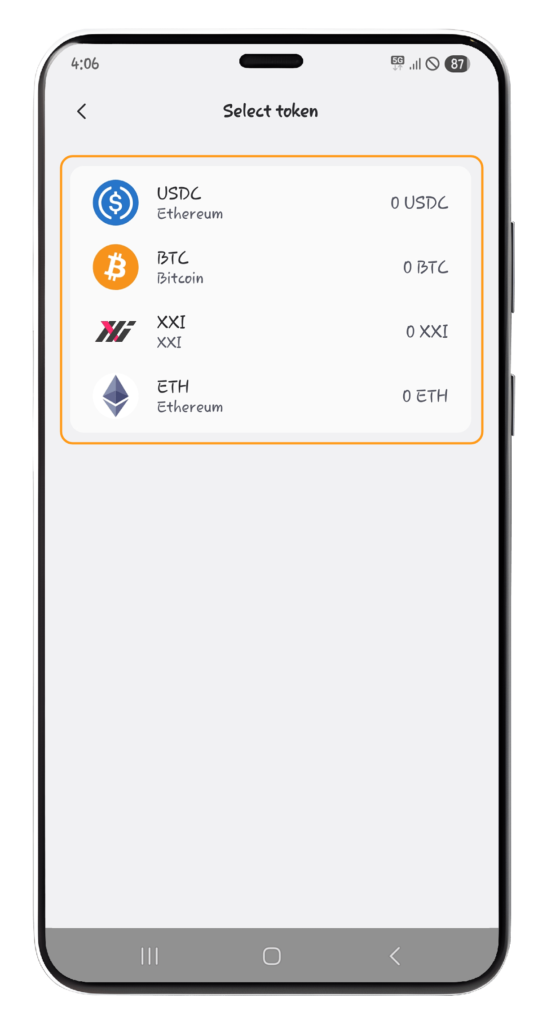
You will need to fill out the required crypto wallet details, such as the wallet address, network, asset, and amount, depending on what is required in the app. 
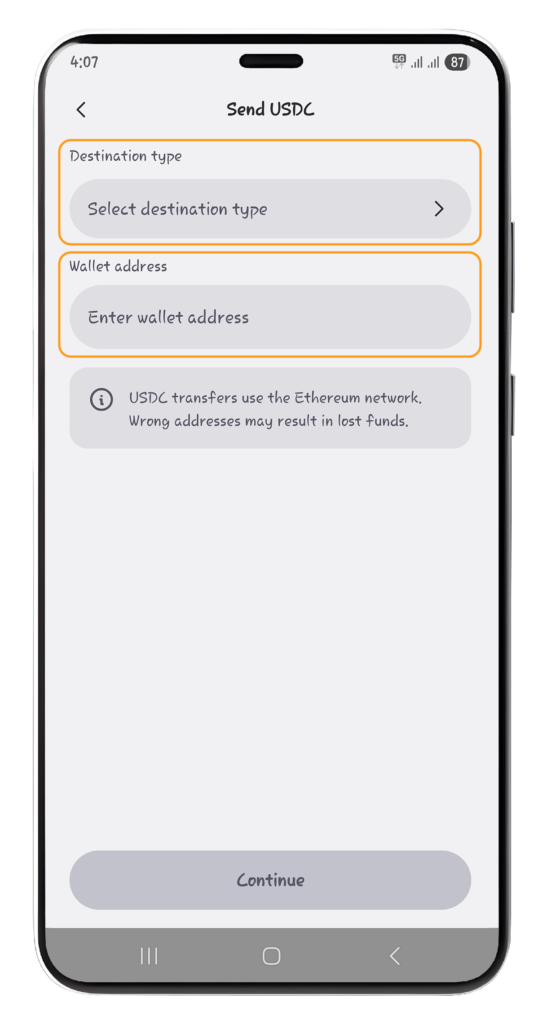
Always check the wallet address and network carefully before confirming. Crypto transactions may not be reversible once completed. 

Example Use Case 

Use this option when you want to move crypto to your personal DOPAY e-wallet or another user’s DOPAY user’s crypto wallet. 

Benefit 

This gives you more flexibility in managing your digital assets outside the DOPAY app. 

Option 3: Send to In-App User 

Choose “Send to in-app user” if you want to send funds to another DOPAY user. 
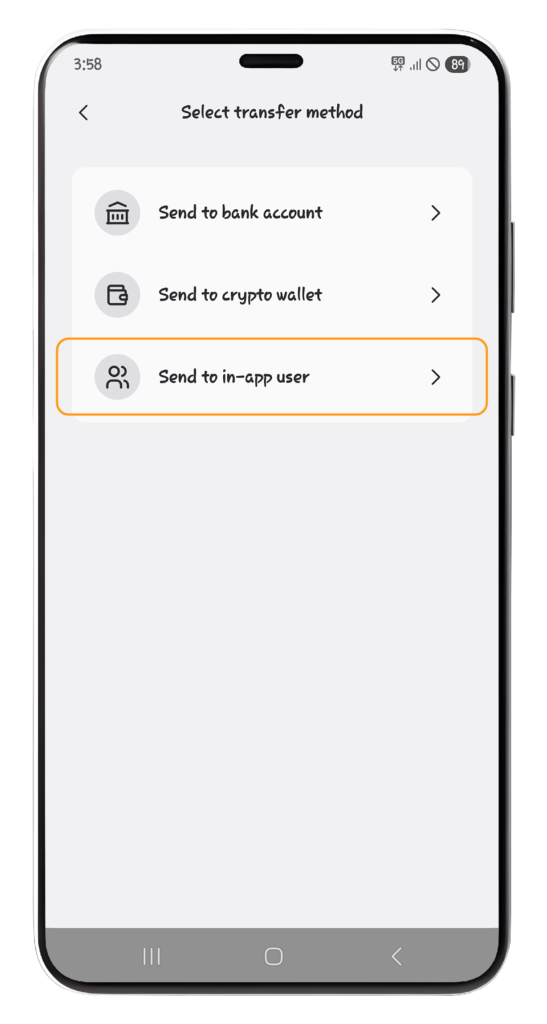
Then, Choose your preferred “Token.” 
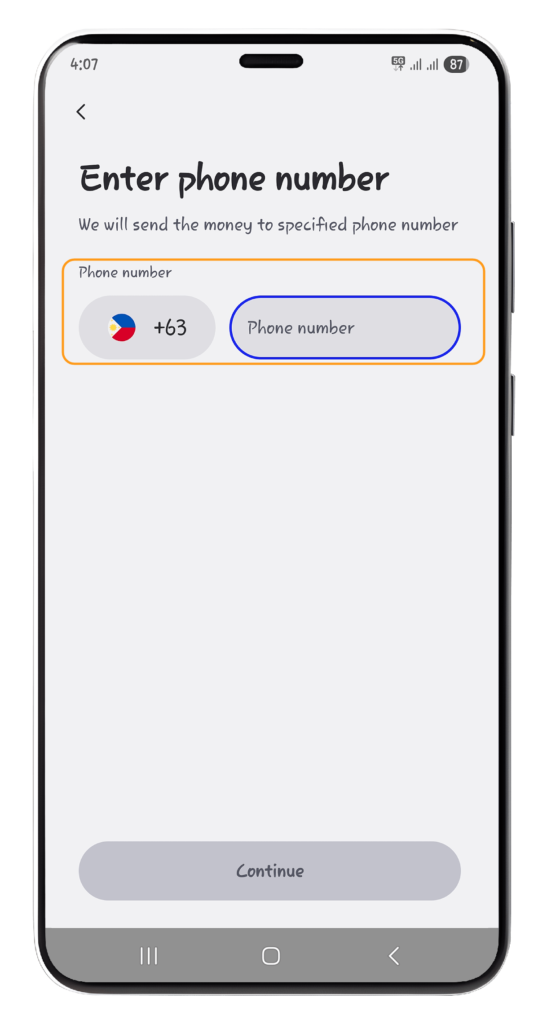
You will need to enter the required recipient details and the amount you want to send. 
Example Use Case 

Use this option when you want to send money to a friend, family member, colleague, or another DOPAY user quickly. 

Benefit 

This is a convenient way to transfer funds within the DOPAY app without needing external bank or wallet details. 

Important Reminders Before You Confirm 

Before completing your withdrawal or transfer, always review the transaction details carefully. 

Check the following: 

  • Recipient name or account holder name  
  • Bank account number or crypto wallet address  
  • Transfer amount  
  • Selected bank, wallet, or transfer option  
  • Applicable fees, if shown  
  • Network or processing details, if applicable  

Once your transaction is successful, you will receive an in-app confirmation. 
Share this post:

Latest Articles

Close-up of a digital stock trading app interface with investment charts and market trends displayed.

PH Courts Global Tech Titans as Pax Silica Gains Momentum and BCDA Investments Surge

The Philippine government is intensifying efforts to position the country as a major player in the global semiconductor and advanced manufacturing supply chain.  The Bases Conversion and Development Authority (BCDA) is planning to woo global technology giants—including Apple, Nvidia, TSMC, MediaTek, Qualcomm, AMD, Broadcom, and UMC—to locate operations within the

Illegal Casinos Found Hiding Behind 8,000 Fake Ordinary Businesses by BSP 

A small bakery, beauty salon, or neighborhood store may seem like an unlikely place for illegal gambling transactions. But according to the Bangko Sental ng Pilipinas (BSP), some businesses using these ordinary identities were being used to collect bets for illegal online casinos.   The central bank uncovered the scheme through

Demonstrators in Metro Manila demand higher wages and economic relief in a public protest.

A Financial Safety Net Still Out of Reach for Many Filipinos 

For many Filipino families, an unexpected expense can quickly become a financial burden, prompting a new push for stronger financial resilience.  The Bangko Sentral ng Pilipinas (BSP) and the Global Finance & Technology Network (GFTN),with support from the UN Secretary-General’s Special Advocate for Financial Health, have launched the ASEAN Financial

InstaPay, PESONet Transactions Reach ₱22 Trillion in August 2026 

The Philippine digital payments ecosystem has reached another historic milestone.  According to data from the Bangko Sentral ng Pilipinas (BSP), Filipinos moved ₱22.1 trillion through InstaPay and PESONet from January to August 2026, a 44 percent increase from the same period last year.   Even more striking is the surge in

GCash Parent Mynt Set for Philippine IPO Record 

Mynt Inc., the parent company of  Gcash, is moving closer to what could become a landmark moment for the Philippines stock market after the Philippine Stock Exchange Inc. (PSE) approved its initial public offering (IPO) application.   The offering is expected to raise as much as ₱92.32 billion, making it the

RCBC Grants Lifetime Fee Waiver for Dispute Escalated to the BSP 

A recent case involving a Rizal Commercial Banking Corporation (RCBC) credit cardholder has placed financial consumer protection in the spotlight, portraying how regulatory intervention can correct missteps in bank practices and strengthen trust in the financial system.  According to media reports, an RCBC customer—identified online as Jude (user @sayperjude on

Download DOPAY.ph Now!

Bringing Your Money Closer to Home.

Whether you’re in the Philippines or working abroad as OFW, DOPAY makes it easier to manage and transfer your funds.

With our low remittance fee, you can enjoy a digital wallet built for convenient and cost-efficient transactions.

DOPAY Download App

Related Articles:

woman standing in front of store

Top 6 Remittances Services for OFWs in Hong Kong 

This article evaluates the six best remittance services available to OFWs in Hong Kong sending money to the Philippines. The services were selected based on three key criteria: cost, speed, and convenience.
Close-up of gold Bitcoin coins on a backlit keyboard with trading app on smartphone.

Maker vs Taker Fees Explained: How Smart Crypto Traders Reduce Costs and Create Value Through Liquidity

In crypto trading, not all orders are treated equally. Some orders add liquidity to the market. Others remove liquidity from the market.
a pile of different currency sitting on top of each other

Receiving International Payments in the Philippines

BPOs, SMEs, and families of OFWs benefit from digital solutions to receiving foreign funds.
5000 banknote on white table

How to Transfer Money from Banks to Digital Wallets

Transfer money abroad from Philippine banks can be very expensive due to high and hidden fees and exchange rate charges.

DOPAY Trade & Earn Crypto Reward Program

Earn more with every crypto trade on DOPAY. Become a Maker and receive a 0.3% rebate on eligible transactions, credited directly to your crypto wallet.