
Why you should know this
Market analysis cannot protect an account whose login is stolen. Authentication is the gate before every deposit, withdrawal and trade. The good news is that a few well-chosen layers can remove common single points of failure.
We are not trying to become security engineers overnight. We are arranging ordinary controls so they support one another.
Layer 1: a unique password
If the service uses passwords, choose a long, unique one that is not reused for email, banking, social media or another exchange. Reuse allows a breach at one site to become a key for several accounts.
A reputable password manager can generate and store unique passwords. Protect the manager itself with strong authentication and a recoverable plan. Do not paste passwords into chat, notes shared with colleagues or a “support verification” form.
Why password reuse changes the risk
An attacker does not need to break a crypto provider if another website has already exposed an email-and-password pair. Automated attempts can try the same pair on many services. A slightly altered reuse pattern—adding the site name or changing one digit—may still be guessed after one password is seen.
Unique means no other account uses that secret. Long and generated is usually easier to manage reliably than a short clever phrase. A password manager reduces memory pressure, but it becomes an important account of its own: secure its email, MFA, recovery method and trusted devices.
Never disclose a password to support. A provider can authenticate you through its controlled process without asking you to read the password aloud or enter it into a form sent by a stranger.
Layer 2: a passkey when supported
A passkey uses public-key authentication tied to the legitimate service. Supported implementations can be more resistant to phishing than a typed password because the authenticator checks the site relationship rather than handing a reusable secret to the page.
Passkeys still need device security and recovery planning. Understand whether the passkey is synchronized, stored on one device or backed by a hardware security key. Do not delete the only working credential before confirming another recovery method.
Unlike a password, a passkey does not normally send a reusable login secret to the website. The authenticator proves control for the correct service. This can block a look-alike domain from receiving a credential it can replay. It does not make every prompt safe: malware, an already-unlocked device or a user approving the wrong financial action can create different risks.
During setup, note where the passkey lives. It may sync through a platform account, remain on one device or sit on a separate security key. The recovery security of that platform account now matters. If you add a hardware key, register a supported backup before putting the only key somewhere “very safe” and then discovering it is also very lost.
Layer 3: two-factor or multifactor authentication
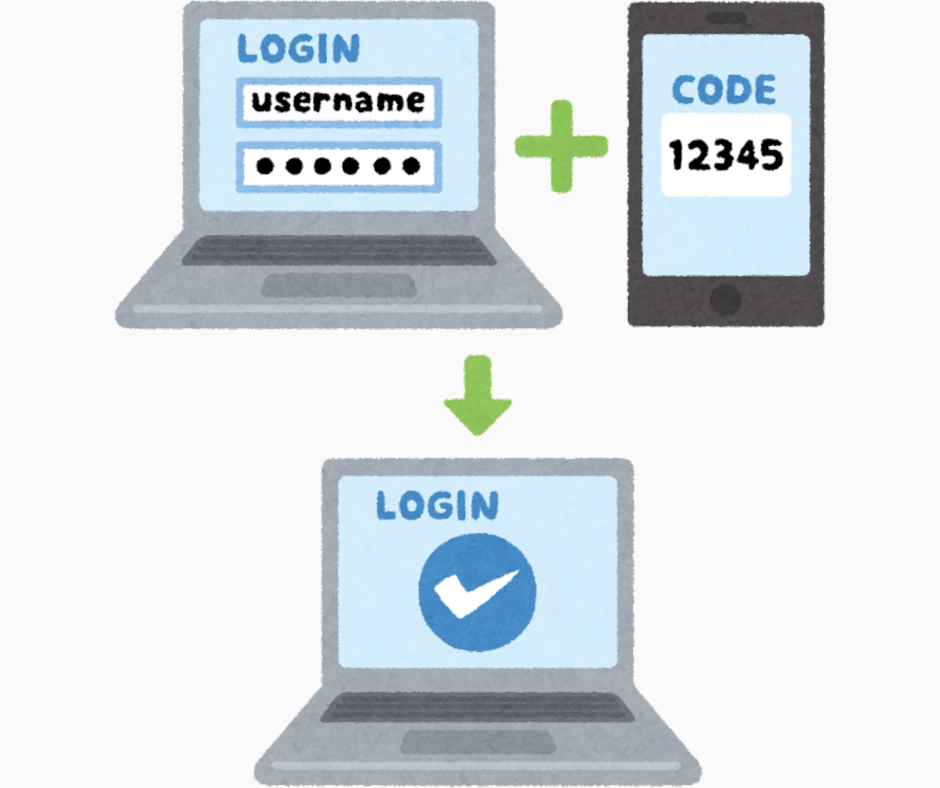
MFA asks for another factor in addition to a password. Options vary:
- Hardware security key or phishing-resistant passkey: strong when correctly supported and backed up.
- Authenticator app: generates time-based codes and is generally less exposed to SIM swapping than SMS.
- SMS code: better than password-only in many cases, but the phone number can be targeted through SIM swap or port-out fraud.
- Email code: depends on the security of the email account and its recovery path.
Use the strongest supported method you can operate reliably. Never read a one-time code to someone who contacted you.
MFA works best when the factors do not fail together. If email receives the password reset, the second-factor code and the recovery notice, compromise of that email may collapse several layers at once. Separate channels where the service permits it, and secure the recovery account at least as carefully as the crypto account.
Repeated approval prompts you did not initiate are not a nuisance to clear. They may be an attacker hoping for an accidental “yes.” Deny them, change the exposed first factor through the official route, review sessions and contact the provider if needed.
Layer 4: recovery that does not become a back door
Download or record recovery codes during setup and keep them offline in a protected place. Confirm backup authenticators, phone numbers and email addresses. Remove old devices and recovery contacts you no longer control.
Recovery deserves the same protection as login. A strong passkey cannot help if a weak email account can reset it immediately.
Plan for normal change, not only attack. Phones break, numbers change, authenticator apps are replaced and employees leave. Before migrating, add and test the new authenticator through the provider’s supported process, then remove the old one. Never rely on a screenshot of an authenticator QR code stored beside the account password.
For a shared business process, do not solve continuity by sharing one person’s password and OTP. Use supported role accounts, approvals or enterprise controls. Personal accounts and team custody need different governance.
A complete setup sequence
- Secure the primary email first with unique authentication and MFA.
- Update the phone or computer and review the screen lock.
- Open the service through a verified bookmark or official app.
- Add the unique password or supported passkey.
- Enable the strongest practical MFA method.
- Store recovery codes and configure a backup authenticator.
- Review active sessions, login alerts and withdrawal protections.
- Sign out and confirm that you can log in and recover safely—without exposing real secrets.
Turn the setup into an authentication map
Use a non-secret table like this for each important account:
| Layer | What to record | What not to record |
|---|---|---|
| Primary login | Password manager or passkey location | The password itself |
| Second factor | Authenticator, hardware key or SMS type | Current codes or setup QR |
| Recovery | Number of offline codes and backup method | Recovery-code values |
| Which protected account is linked | Email password | |
| Device | Authorized device names and last review | Unlock PIN |
| Alerts | Enabled channels and expected sender domain | Sensitive screenshots |
The map reveals concentration without creating a treasure sheet. If every row points to the same phone, decide which supported backup would keep loss of that phone from becoming loss of access.
Filipino mobile-user scenario
Paolo uses one phone for email, SMS, authenticator codes and crypto. That is convenient, but the phone is a concentrated risk.
He enables a strong screen lock, stores recovery codes away from the phone, secures the email separately and adds a backup authenticator where the service allows it. If his SIM stops working unexpectedly, he knows to contact the carrier and provider through independently verified channels.
Common setup mistakes
- Reusing the same password for email and crypto.
- Treating SMS as invulnerable.
- Storing a password and recovery code in the same unlocked note.
- Approving repeated MFA prompts just to make them stop.
- Keeping former staff, old phones or unknown sessions connected.
- Assuming biometrics replace every recovery credential.
Another mistake is choosing a theoretically strong control that the user cannot recover or operate. Security must survive an ordinary Monday: a replacement phone, travel, a weak signal or a forgotten device. Strong and rehearsed beats strong and mysterious.
A safe recovery drill
Do not lock yourself out for practice. Instead, use the provider’s official settings to verify that backup methods are present and current. Confirm where recovery codes are stored, whether a second authenticator or key is registered, and how to contact support without a search-engine advertisement.
Write a sequence such as: secure email, open bookmarked provider, use backup key, revoke lost device, review sessions, rotate exposed credentials. Keep secrets out of the sequence. Rehearse it verbally once. The aim is calm execution, not testing the provider’s fraud team with a fake emergency.
Match authentication to the consequence
Not every account has the same impact. An email that can reset banking, crypto and a password manager is a higher-value target than a newsletter account. Give the stronger phishing-resistant factor, independent recovery and more frequent session review to the accounts that can unlock other accounts or move value.
For high-value withdrawals, use provider features such as address allowlists, time delays or additional approvals when they fit the purpose. These are transaction controls, not replacements for MFA. A stolen login may still be dangerous even when a withdrawal is delayed, so treat unexpected change notices as security alerts.
Review the map after a phone replacement, overseas travel, employee departure, new passkey, changed email or provider policy update. Authentication is a maintained system, not a one-time setup ceremony.
How this connects to market mastery
Professional security applies the same ideas at larger scale: separate duties, remove single points of failure, verify authorization and maintain recovery. A trader’s first operational risk limit is not a stop-loss—it is control of the account.
Key takeaways and check
- Use unique credentials; protect email before the crypto account.
- Prefer supported phishing-resistant authentication or authenticator apps over weaker recovery paths where practical.
- Treat recovery codes and backup authenticators as sensitive assets.
- Review sessions and recovery methods, not only the main password.
Security check: Can you recover the account if the phone disappears today without giving a code or password to another person?